

Frequently purchased together
-
Bluelab 校准溶液 pH 4.0 - 500 毫升
常规价格 $28.61常规价格 -
Bluelab 校准溶液 pH 7.0 - 500 毫升
常规价格 $28.61常规价格 -
-
Bluelab pH 和电导率探头保养套装
常规价格 $43.00常规价格


Reviews are submitted by verified customers after purchase. This section shows a summary of product feedback rather than the full individual review list.

Store Availability
Newmarket, Ontario (Head Office)
1175 Stellar Drive, Unit #5
Newmarket, ON L3Y 7B8
- Mon10:00am–6:00pm
- Tue10:00am–6:00pm
- Wed10:00am–6:00pm
- Thu10:00am–6:00pm
- Fri10:00am–6:00pm
- Sat10:00am–4:00pm
- SunClosed


Barrie, Ontario
106 Saunders Road, Unit #2A
Barrie, ON L4N 9A8
- Mon10:00am–5:00pm
- Tue10:00am–5:00pm
- Wed10:00am–5:00pm
- Thu10:00am–5:00pm
- Fri10:00am–5:00pm
- Sat10:00am–3:00pm
- SunClosed
Winnipeg, Manitoba
915 McLeod Avenue, Unit #4
Winnipeg, MB R2G 0Y4
- Mon10:00am–6:00pm
- Tue10:00am–6:00pm
- Wed10:00am–6:00pm
- Thu10:00am–6:00pm
- Fri10:00am–6:00pm
- Sat11:00am–3:00pm
- SunClosed
Estimated Delivery Date
Order Within
—
Province
Est. Delivery
—
数量
Qualifies for Free Shipping Promotion
Sign in required
Back-in-stock notification
Select the store locations where you’d like to pick up this item, or choose Shipping to have it delivered.
Email notifications are turned off
Turn on email marketing to receive back-in-stock notifications.
Open account profile
Special order request
Select the store where you’d prefer to pick up your special order. To choose a different store, unselect your current choice first.
Description
Description
Description
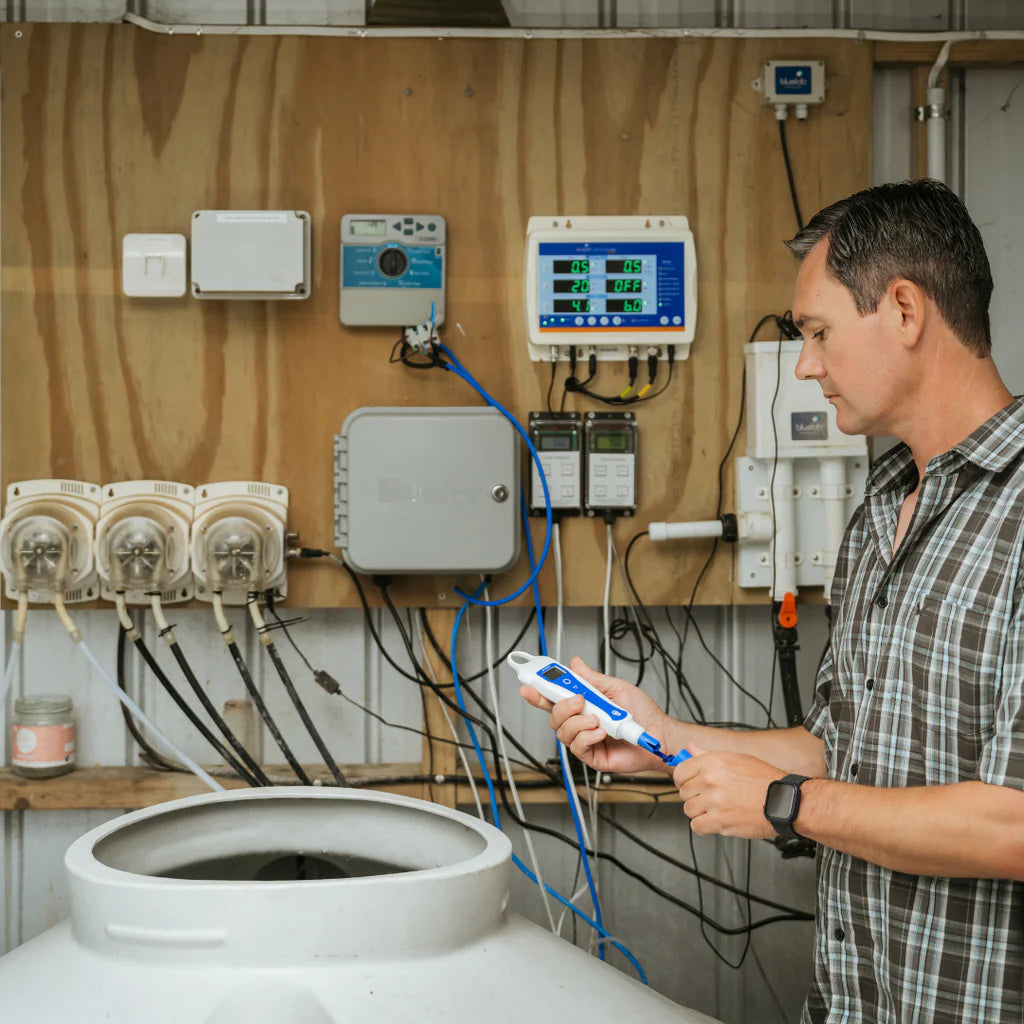
Bluelab pH PenPlus 是一款手持式 pH 和温度测量笔,用于测量水培和灌溉种植系统中的营养液和径流。这款数字测量工具专为种植者设计,他们希望在保持 pH 和温度信息触手可及的同时,获得快速、可靠的读数。它采用紧凑的手持设计、明亮的背光显示屏和读数保持功能,支持在基于溶液的种植环境中做出清晰的日常决策。
其主要升级在于可更换的 pH/温度探头,当探头自然磨损时,这有助于延长产品寿命。双结 pH 探头支持可靠测量,而旋盖探头设计使探头成为测量笔的可维修部件。填充氯化钾(KCl)的硅胶帽带有内部海绵,有助于保持探头湿润,集成挂绳和防水硅胶探头帽使测量笔在繁忙的种植空间中实用。
为了植物健康,Bluelab pH PenPlus 帮助种植者了解营养液的 pH 值和温度,以便根区能够保持在适合营养吸收的范围内。在水培和灌溉系统中,pH 值影响植物吸收营养的有效性。径流 pH 值和温度读数有助于识别根部周围的变化,让种植者在生长条件变得过于酸性或过于碱性之前更好地了解情况。
这款 pH 和温度测量笔还包括校准提醒、自动关机功能和 IP68 防尘防水等级。显示屏设计易于阅读,温度可以摄氏度或华氏度显示。其手持式设计适用于家庭种植者和商业种植者,他们需要一个可靠的 pH 测量笔进行溶液测量,而无需连接应用程序。
Bluelab pH PenPlus 非常适合在水培或灌溉设置中管理营养液、径流和根区 pH 值可见性的种植者。它将可更换探头、防水手持设计和可靠的 pH 值信心集于一体,是一款为长期种植室测量而设计的紧凑型工具。
如何使用:
首次使用前:
首次使用前,探头必须进行水合和校准。
取下存储帽,将探头尖端放入 Bluelab pH 探头氯化钾(KCl)存储溶液中 24 小时。水合后,用清水冲洗探头尖端,然后在进行读数之前校准测量笔。
请勿让探头尖端变干。
如何打开和关闭测量笔:
短按电源按钮打开测量笔。
测量笔打开时,短按电源按钮可在屏幕上保持读数。
长按电源按钮关闭测量笔。
测量笔还具有自动关机功能,以帮助节省电池寿命。
更改温度单位:
按住单位按钮,直到温度单位闪烁。
短按单位按钮可在 °C 和 °F 之间切换。
几秒钟后,屏幕将恢复正常。
如何校准测量笔:
首次使用前、清洁和水合后、更换探头后、读数似乎出乎意料时,或屏幕上校准复选标记消失时,都需要进行校准。
首先使用新鲜的 Bluelab pH 7.0 校准溶液。将探头尖端放入 pH 7.0 溶液中,然后按住 CAL 按钮,直到显示屏上出现“CAL”。松开按钮,让探头留在溶液中,同时显示屏闪烁。当闪烁停止时,pH 7 校准点完成。
用干净的自来水冲洗探头尖端,轻轻甩掉多余的水。
接下来,将探头尖端放入新鲜的 Bluelab pH 4.0 校准溶液中。如果您的读数通常高于 pH 7.0,则可以使用 pH 10.0 校准溶液代替 pH 4.0。按住 CAL 按钮,直到出现“CAL”,然后松开按钮,让探头留在溶液中,同时显示屏闪烁。当闪烁停止时,第二个校准点完成。
显示屏上的复选标记确认校准成功。复选标记在 30 天后消失,以提醒重新校准。
pH PenPlus 必须校准到 2 个点。始终先校准到 pH 7,然后是 pH 4 或 pH 10。如果仅校准到 pH 7,测量笔将无法保持校准。
每次使用后:
在更换存储帽之前,用清水冲洗探头尖端。
向硅胶存储帽内的海绵中添加 3-5 滴 Bluelab pH 探头氯化钾(KCl)存储溶液,以保持探头湿润。
将存储帽牢固地放回探头尖端上。
请勿将探头存放在反渗透水、蒸馏水或去离子水中。
定期清洁:
为了保持读数准确,请定期清洁探头。
用清水冲洗探头尖端。
用干净的水填充一个小容器,并添加少量 Bluelab pH 探头清洁剂或温和的洗碗液。
轻轻搅拌探头尖端在清洁混合物中。请勿让探头撞击容器侧面。
用新鲜的流水彻底冲洗,去除所有清洁剂或洗涤剂。
对于较重的堆积物,用几滴 Bluelab pH 探头清洁剂或温和洗涤剂,使用软牙刷轻轻刷拭玻璃器皿周围。之后彻底冲洗。
清洁后,水合探头并在进行读数之前校准测量笔。
储存:
对于正常储存,保持探头尖端在存储帽内湿润。每周一次向帽内海绵中添加 3-5 滴氯化钾(KCl)存储溶液。
对于长期储存,取下存储帽,将测量笔直立放置在塑料容器中,并用 Bluelab pH 探头氯化钾(KCl)存储溶液覆盖探头尖端。定期检查容器并根据需要补充。
如果探头尖端变干,将其放入 Bluelab pH 探头氯化钾(KCl)存储溶液中水合 24 小时。
水合后,校准测量笔以检查探头是否仍然正常工作。
探头保养警告:
请勿让探头尖端变干。
请勿用手指触摸玻璃球泡。
请勿敲击或跌落测量笔,因为这可能会损坏玻璃探头。
请勿将冷探头放入热液体中,或将热探头放入冷液体中。
请勿将 pH 探头浸泡或冲洗在反渗透水、蒸馏水或去离子水中。
请勿将探头浸入可能覆盖玻璃球泡的油、蛋白质或重悬浮固体中。
更换探头:
pH PenPlus 使用可更换的 Bluelab pH ProbePlus。
如果探头损坏或无法再校准,请更换探头。
要更换探头,请关闭测量笔并取下存储帽。拧下环,取出旧探头,插入替换探头,然后将环拧回直到牢固连接。
在进行读数之前,水合并校准新探头。
更换电池:
pH PenPlus 使用 1 节 AAA 碱性电池。请勿使用充电电池。
当出现低电量符号时,请更换电池。
取下电池盖,取出旧电池,并检查是否腐蚀。将一节新的 AAA 碱性电池插入,正极朝下。
在盖上电池盖之前,请确保防水电池盖密封圈干净。拧紧电池盖,直到盖子和主体之间没有缝隙。
基本故障排除:
如果读数缓慢漂移,请清洁探头、水合探头并重新校准。
如果校准失败,请使用新鲜的校准溶液,清洁探头、水合探头并重试。
如果测量笔在所有校准溶液中显示相似的 pH 值,则探头可能已损坏,可能需要更换。
如果读数跳动,请确保探头尖端正确浸入测试溶液中。
如果在成功校准后读数仍然不正确,请清洁并水合探头,然后重新校准。如果问题仍然存在,探头可能需要更换。
产品优点:室内;准确性;植物健康;易于设置;紧凑;一致的结果;持久;一致的性能。
规格:pH 范围:0 - 14 pH;pH 分辨率:0.1 pH;pH 精度:±0.1 pH;温度范围:0.0 - 50.0 °C;温度精度:±1 °C;温度精度:±2 °C;操作温度:0 - 50 °C;电池类型:AAA;防水等级:IP-68;包装内含:pH 笔:1;校准溶液 7.0:1;校准溶液 4.0:1;存储溶液:1。
其主要升级在于可更换的 pH/温度探头,当探头自然磨损时,这有助于延长产品寿命。双结 pH 探头支持可靠测量,而旋盖探头设计使探头成为测量笔的可维修部件。填充氯化钾(KCl)的硅胶帽带有内部海绵,有助于保持探头湿润,集成挂绳和防水硅胶探头帽使测量笔在繁忙的种植空间中实用。
为了植物健康,Bluelab pH PenPlus 帮助种植者了解营养液的 pH 值和温度,以便根区能够保持在适合营养吸收的范围内。在水培和灌溉系统中,pH 值影响植物吸收营养的有效性。径流 pH 值和温度读数有助于识别根部周围的变化,让种植者在生长条件变得过于酸性或过于碱性之前更好地了解情况。
这款 pH 和温度测量笔还包括校准提醒、自动关机功能和 IP68 防尘防水等级。显示屏设计易于阅读,温度可以摄氏度或华氏度显示。其手持式设计适用于家庭种植者和商业种植者,他们需要一个可靠的 pH 测量笔进行溶液测量,而无需连接应用程序。
Bluelab pH PenPlus 非常适合在水培或灌溉设置中管理营养液、径流和根区 pH 值可见性的种植者。它将可更换探头、防水手持设计和可靠的 pH 值信心集于一体,是一款为长期种植室测量而设计的紧凑型工具。
如何使用:
首次使用前:
首次使用前,探头必须进行水合和校准。
取下存储帽,将探头尖端放入 Bluelab pH 探头氯化钾(KCl)存储溶液中 24 小时。水合后,用清水冲洗探头尖端,然后在进行读数之前校准测量笔。
请勿让探头尖端变干。
如何打开和关闭测量笔:
短按电源按钮打开测量笔。
测量笔打开时,短按电源按钮可在屏幕上保持读数。
长按电源按钮关闭测量笔。
测量笔还具有自动关机功能,以帮助节省电池寿命。
更改温度单位:
按住单位按钮,直到温度单位闪烁。
短按单位按钮可在 °C 和 °F 之间切换。
几秒钟后,屏幕将恢复正常。
如何校准测量笔:
首次使用前、清洁和水合后、更换探头后、读数似乎出乎意料时,或屏幕上校准复选标记消失时,都需要进行校准。
首先使用新鲜的 Bluelab pH 7.0 校准溶液。将探头尖端放入 pH 7.0 溶液中,然后按住 CAL 按钮,直到显示屏上出现“CAL”。松开按钮,让探头留在溶液中,同时显示屏闪烁。当闪烁停止时,pH 7 校准点完成。
用干净的自来水冲洗探头尖端,轻轻甩掉多余的水。
接下来,将探头尖端放入新鲜的 Bluelab pH 4.0 校准溶液中。如果您的读数通常高于 pH 7.0,则可以使用 pH 10.0 校准溶液代替 pH 4.0。按住 CAL 按钮,直到出现“CAL”,然后松开按钮,让探头留在溶液中,同时显示屏闪烁。当闪烁停止时,第二个校准点完成。
显示屏上的复选标记确认校准成功。复选标记在 30 天后消失,以提醒重新校准。
pH PenPlus 必须校准到 2 个点。始终先校准到 pH 7,然后是 pH 4 或 pH 10。如果仅校准到 pH 7,测量笔将无法保持校准。
每次使用后:
在更换存储帽之前,用清水冲洗探头尖端。
向硅胶存储帽内的海绵中添加 3-5 滴 Bluelab pH 探头氯化钾(KCl)存储溶液,以保持探头湿润。
将存储帽牢固地放回探头尖端上。
请勿将探头存放在反渗透水、蒸馏水或去离子水中。
定期清洁:
为了保持读数准确,请定期清洁探头。
用清水冲洗探头尖端。
用干净的水填充一个小容器,并添加少量 Bluelab pH 探头清洁剂或温和的洗碗液。
轻轻搅拌探头尖端在清洁混合物中。请勿让探头撞击容器侧面。
用新鲜的流水彻底冲洗,去除所有清洁剂或洗涤剂。
对于较重的堆积物,用几滴 Bluelab pH 探头清洁剂或温和洗涤剂,使用软牙刷轻轻刷拭玻璃器皿周围。之后彻底冲洗。
清洁后,水合探头并在进行读数之前校准测量笔。
储存:
对于正常储存,保持探头尖端在存储帽内湿润。每周一次向帽内海绵中添加 3-5 滴氯化钾(KCl)存储溶液。
对于长期储存,取下存储帽,将测量笔直立放置在塑料容器中,并用 Bluelab pH 探头氯化钾(KCl)存储溶液覆盖探头尖端。定期检查容器并根据需要补充。
如果探头尖端变干,将其放入 Bluelab pH 探头氯化钾(KCl)存储溶液中水合 24 小时。
水合后,校准测量笔以检查探头是否仍然正常工作。
探头保养警告:
请勿让探头尖端变干。
请勿用手指触摸玻璃球泡。
请勿敲击或跌落测量笔,因为这可能会损坏玻璃探头。
请勿将冷探头放入热液体中,或将热探头放入冷液体中。
请勿将 pH 探头浸泡或冲洗在反渗透水、蒸馏水或去离子水中。
请勿将探头浸入可能覆盖玻璃球泡的油、蛋白质或重悬浮固体中。
更换探头:
pH PenPlus 使用可更换的 Bluelab pH ProbePlus。
如果探头损坏或无法再校准,请更换探头。
要更换探头,请关闭测量笔并取下存储帽。拧下环,取出旧探头,插入替换探头,然后将环拧回直到牢固连接。
在进行读数之前,水合并校准新探头。
更换电池:
pH PenPlus 使用 1 节 AAA 碱性电池。请勿使用充电电池。
当出现低电量符号时,请更换电池。
取下电池盖,取出旧电池,并检查是否腐蚀。将一节新的 AAA 碱性电池插入,正极朝下。
在盖上电池盖之前,请确保防水电池盖密封圈干净。拧紧电池盖,直到盖子和主体之间没有缝隙。
基本故障排除:
如果读数缓慢漂移,请清洁探头、水合探头并重新校准。
如果校准失败,请使用新鲜的校准溶液,清洁探头、水合探头并重试。
如果测量笔在所有校准溶液中显示相似的 pH 值,则探头可能已损坏,可能需要更换。
如果读数跳动,请确保探头尖端正确浸入测试溶液中。
如果在成功校准后读数仍然不正确,请清洁并水合探头,然后重新校准。如果问题仍然存在,探头可能需要更换。
产品优点:室内;准确性;植物健康;易于设置;紧凑;一致的结果;持久;一致的性能。
规格:pH 范围:0 - 14 pH;pH 分辨率:0.1 pH;pH 精度:±0.1 pH;温度范围:0.0 - 50.0 °C;温度精度:±1 °C;温度精度:±2 °C;操作温度:0 - 50 °C;电池类型:AAA;防水等级:IP-68;包装内含:pH 笔:1;校准溶液 7.0:1;校准溶液 4.0:1;存储溶液:1。
How To Use
How To Use
Before first use
How to turn the pen on and off
Changing temperature units
How to calibrate the pen
After each use
Regular cleaning
Storage
Probe care warnings
Replacing the probe
Battery replacement
Basic troubleshooting
Specifications
Specifications
| pH Range | 0 - 14 pH |
|---|---|
| pH Resolution | 0.1 pH |
| pH Accuracy | ±0.1 pH |
| Temperature Range | 0.0 - 50.0 °C |
| Temperature Accuracy | ±1 °C |
| Temperature Accuracy | ±2 °C |
| Operating Temperature | 0 - 50 °C |
| Battery Type | AAA |
| Waterproof Rating | IP-68 |
| Inside The Box | |
| pH Pen | 1 |
| Calibration Solution 7.0 | 1 |
| Calibration Solution 4.0 | 1 |
| Storage Solution | 1 |
Safety & Technical Documents
Safety & Technical Documents
Frequently purchased together
-
Bluelab 校准溶液 pH 4.0 - 500 毫升
常规价格 $28.61常规价格 -
Bluelab 校准溶液 pH 7.0 - 500 毫升
常规价格 $28.61常规价格 -
-
Bluelab pH 和电导率探头保养套装
常规价格 $43.00常规价格
Reviews are submitted by verified customers after purchase. This section shows a summary of product feedback rather than the full individual review list.