

Frequently purchased together
-
Bluelab Calibration Solutions pH 4.0 - 500 ML
Regular price $28.61Regular price -
Bluelab Calibration Solutions pH 7.0 - 500 ML
Regular price $28.61Regular price -
Bluelab KCl Storage Solution - 120 ML
Regular price $24.57Regular price -
Bluelab pH & Conductivity Probe Care Kit
Regular price $43.00Regular price


Reviews are submitted by verified customers after purchase. This section shows a summary of product feedback rather than the full individual review list.

Store Availability
Newmarket, Ontario (Head Office)
1175 Stellar Drive, Unit #5
Newmarket, ON L3Y 7B8
- Mon10:00am–6:00pm
- Tue10:00am–6:00pm
- Wed10:00am–6:00pm
- Thu10:00am–6:00pm
- Fri10:00am–6:00pm
- Sat10:00am–4:00pm
- SunClosed


Barrie, Ontario
106 Saunders Road, Unit #2A
Barrie, ON L4N 9A8
- Mon10:00am–5:00pm
- Tue10:00am–5:00pm
- Wed10:00am–5:00pm
- Thu10:00am–5:00pm
- Fri10:00am–5:00pm
- Sat10:00am–3:00pm
- SunClosed
Winnipeg, Manitoba
915 McLeod Avenue, Unit #4
Winnipeg, MB R2G 0Y4
- Mon10:00am–6:00pm
- Tue10:00am–6:00pm
- Wed10:00am–6:00pm
- Thu10:00am–6:00pm
- Fri10:00am–6:00pm
- Sat11:00am–3:00pm
- SunClosed
Estimated Delivery Date
Order Within
—
Province
Est. Delivery
—
Quantity
Qualifies for Free Shipping Promotion
Description
Description
Description
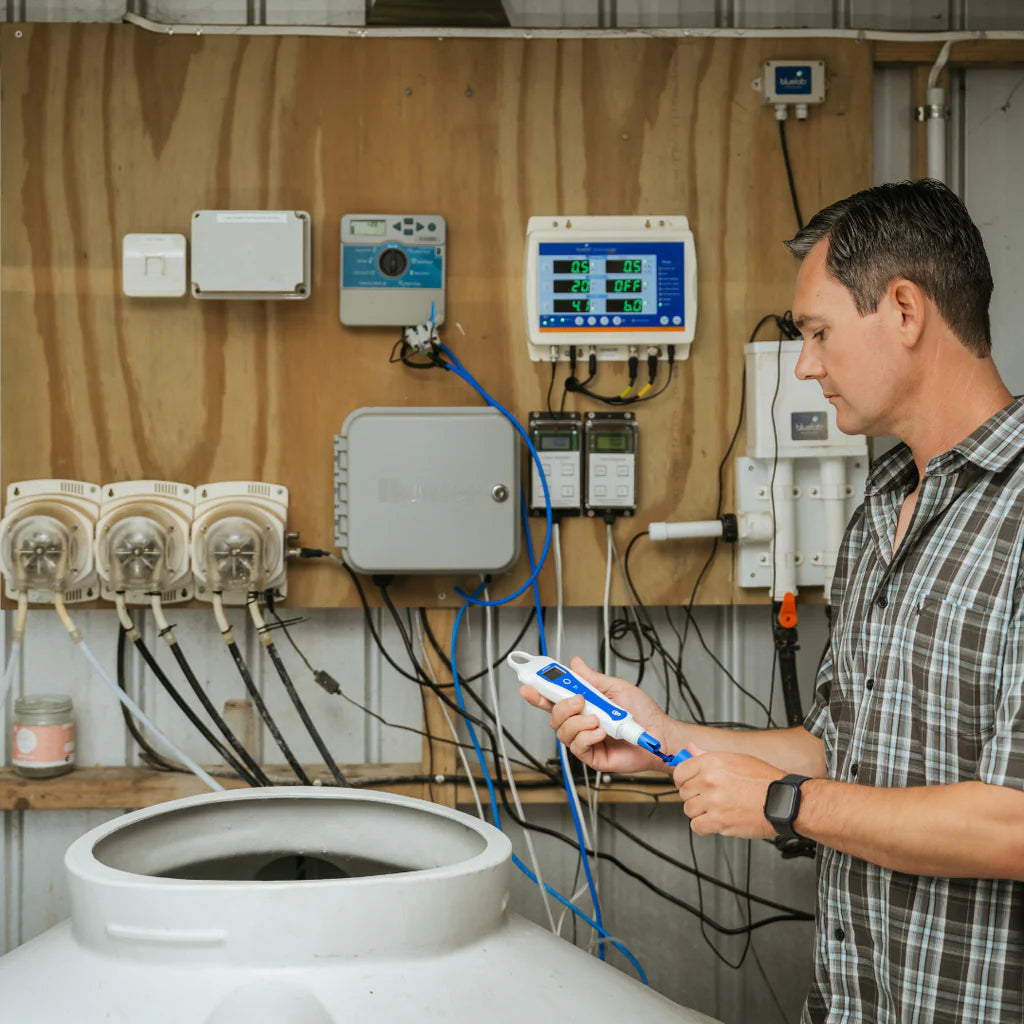
Bluelab pH PenPlus is a handheld pH and temperature pen for measuring nutrient solution and runoff in hydroponic and irrigated growing systems. This digital measurement tool is built for growers who want quick, confident readings while keeping pH and temperature information close at hand. With a compact handheld design, bright backlit display, and hold-reading function, it supports clear daily decision-making in solution-based growing environments.
The key upgrade is its replaceable pH/Temperature probe, which helps extend product life when natural probe wear occurs. A double-junction pH probe supports reliable measurements, while the screw-cap probe design makes the probe a serviceable component of the pen. The KCl-filled silicone cap with internal sponge helps maintain probe hydration, and the integrated lanyard with waterproof silicone probe cap keeps the pen practical for busy grow spaces.
For plant health, the Bluelab pH PenPlus helps growers understand nutrient solution pH and temperature so the root zone can stay in the right range for nutrient uptake. In hydroponic and irrigated systems, pH influences how available nutrients are to the plant. Runoff pH and temperature readings can help identify changes around the roots, giving growers better visibility before growth conditions drift too acidic or too alkaline.
This pH and temperature pen also includes a calibration reminder, auto-off function, and IP68 dustproof and waterproof rating. The display is designed for easy reading, and temperature can be viewed in either Celsius or Fahrenheit. Its handheld format suits both home growers and commercial growers who need a reliable pH pen for solution measurement without a connected app requirement.
Bluelab pH PenPlus is a good fit for growers managing nutrient solution, runoff, and root-zone pH visibility in hydroponic or irrigated setups. It brings together a replaceable probe, waterproof handheld design, and dependable pH confidence in a compact tool made for long-term grow room measurement.
The key upgrade is its replaceable pH/Temperature probe, which helps extend product life when natural probe wear occurs. A double-junction pH probe supports reliable measurements, while the screw-cap probe design makes the probe a serviceable component of the pen. The KCl-filled silicone cap with internal sponge helps maintain probe hydration, and the integrated lanyard with waterproof silicone probe cap keeps the pen practical for busy grow spaces.
For plant health, the Bluelab pH PenPlus helps growers understand nutrient solution pH and temperature so the root zone can stay in the right range for nutrient uptake. In hydroponic and irrigated systems, pH influences how available nutrients are to the plant. Runoff pH and temperature readings can help identify changes around the roots, giving growers better visibility before growth conditions drift too acidic or too alkaline.
This pH and temperature pen also includes a calibration reminder, auto-off function, and IP68 dustproof and waterproof rating. The display is designed for easy reading, and temperature can be viewed in either Celsius or Fahrenheit. Its handheld format suits both home growers and commercial growers who need a reliable pH pen for solution measurement without a connected app requirement.
Bluelab pH PenPlus is a good fit for growers managing nutrient solution, runoff, and root-zone pH visibility in hydroponic or irrigated setups. It brings together a replaceable probe, waterproof handheld design, and dependable pH confidence in a compact tool made for long-term grow room measurement.
How to use
Before first use:
Before using the pen for the first time, the probe must be hydrated and calibrated.
Remove the storage cap and place the probe tip in Bluelab pH Probe KCl Storage Solution for 24 hours. After hydration, rinse the probe tip in fresh water, then calibrate the pen before taking a reading.
Do not let the probe tip dry out.
How to turn the pen on and off:
Short press the power button to turn the pen on.
Short press the power button while the pen is on to hold the reading on the screen.
Long press the power button to turn the pen off.
The pen also has an auto-off function to help save battery life.
Changing temperature units:
Hold the units button until the temperature unit flashes.
Short press the units button to switch between °C and °F.
The screen will return to normal after a few seconds.
How to calibrate the pen:
Calibration is required before first use, after cleaning and hydration, after replacing the probe, when the reading seems unexpected, or when the calibration check mark disappears from the screen.
Use fresh Bluelab pH 7.0 calibration solution first. Place the probe tip into the pH 7.0 solution, then hold the CAL button until “CAL” appears on the display. Release the button and leave the probe in the solution while the display flashes. When flashing stops, the pH 7 calibration point is complete.
Rinse the probe tip in clean tap water and gently shake off excess water.
Next, place the probe tip into fresh Bluelab pH 4.0 calibration solution. If your readings are normally above pH 7.0, pH 10.0 calibration solution may be used instead of pH 4.0. Hold the CAL button until “CAL” appears, then release the button and leave the probe in the solution while the display flashes. When flashing stops, the second calibration point is complete.
A check mark on the display confirms a successful calibration. The check mark disappears after 30 days as a reminder to recalibrate.
The pH PenPlus must be calibrated to 2 points. Always calibrate to pH 7 first, then pH 4 or pH 10. The pen will not hold calibration if only calibrated to pH 7.
After each use:
Rinse the probe tip with fresh water before replacing the storage cap.
Add 3–5 drops of Bluelab pH Probe KCl Storage Solution to the sponge inside the silicone storage cap to keep the probe moist.
Place the storage cap securely back onto the probe tip.
Do not store the probe in reverse osmosis water, distilled water, or de-ionized water.
Regular cleaning:
To keep readings accurate, clean the probe regularly.
Rinse the probe tip under fresh water.
Fill a small container with clean water and add a small amount of Bluelab pH Probe Cleaner or mild dishwashing liquid.
Gently stir the probe tip in the cleaning mixture. Do not knock the probe against the side of the container.
Rinse well under fresh running water to remove all cleaner or detergent.
For heavier buildup, gently brush around the glassware with a few drops of Bluelab pH Probe Cleaner or mild detergent using a soft toothbrush. Rinse well afterward.
After cleaning, hydrate the probe and calibrate the pen before taking readings.
Storage:
For normal storage, keep the probe tip moist inside the storage cap. Add 3–5 drops of KCl storage solution to the sponge inside the cap once a week.
For long-term storage, remove the storage cap, stand the pen upright in a plastic container, and cover the probe tip with Bluelab pH Probe KCl Storage Solution. Check the container regularly and top up as needed.
If the probe tip has dried out, hydrate it in Bluelab pH Probe KCl Storage Solution for 24 hours.
After hydration, calibrate the pen to check whether the probe is still working correctly.
Probe care warnings:
Do not let the probe tip dry out.
Do not touch the glass bulb with your fingers.
Do not knock or drop the pen, as this can damage the glass probe.
Do not place a cold probe into hot liquid, or a hot probe into cold liquid.
Do not soak or rinse the pH probe in reverse osmosis water, distilled water, or de-ionized water.
Do not immerse the probe in oils, proteins, or heavy suspended solids that may coat the glass bulb.
Replacing the probe:
The pH PenPlus uses a replaceable Bluelab pH ProbePlus.
Replace the probe if it is damaged or can no longer be calibrated.
To replace the probe, turn the pen off and remove the storage cap. Unscrew the collar, pull out the old probe, insert the replacement probe, then screw the collar back on until firmly attached.
Hydrate and calibrate the new probe before taking readings.
Battery replacement:
The pH PenPlus uses 1 AAA alkaline battery. Do not use rechargeable batteries.
When the low battery symbol appears, replace the battery.
Remove the battery cap, take out the old battery, and check for corrosion. Insert a new AAA alkaline battery with the positive end facing down into the body.
Make sure the waterproof battery cap seal is clean before replacing the cap. Tighten the battery cap until there is no gap between the cap and the body.
Basic troubleshooting:
If readings slowly drift, clean the probe, hydrate it, and recalibrate.
If calibration fails, use fresh calibration solutions, clean the probe, hydrate it, and try again.
If the pen shows a similar pH in all calibration solutions, the probe may be damaged and may need replacement.
If readings jump around, make sure the probe tip is properly immersed in the test solution.
If readings remain incorrect after successful calibration, clean and hydrate the probe, then recalibrate. If the issue continues, the probe may need replacement.
Before using the pen for the first time, the probe must be hydrated and calibrated.
Remove the storage cap and place the probe tip in Bluelab pH Probe KCl Storage Solution for 24 hours. After hydration, rinse the probe tip in fresh water, then calibrate the pen before taking a reading.
Do not let the probe tip dry out.
How to turn the pen on and off:
Short press the power button to turn the pen on.
Short press the power button while the pen is on to hold the reading on the screen.
Long press the power button to turn the pen off.
The pen also has an auto-off function to help save battery life.
Changing temperature units:
Hold the units button until the temperature unit flashes.
Short press the units button to switch between °C and °F.
The screen will return to normal after a few seconds.
How to calibrate the pen:
Calibration is required before first use, after cleaning and hydration, after replacing the probe, when the reading seems unexpected, or when the calibration check mark disappears from the screen.
Use fresh Bluelab pH 7.0 calibration solution first. Place the probe tip into the pH 7.0 solution, then hold the CAL button until “CAL” appears on the display. Release the button and leave the probe in the solution while the display flashes. When flashing stops, the pH 7 calibration point is complete.
Rinse the probe tip in clean tap water and gently shake off excess water.
Next, place the probe tip into fresh Bluelab pH 4.0 calibration solution. If your readings are normally above pH 7.0, pH 10.0 calibration solution may be used instead of pH 4.0. Hold the CAL button until “CAL” appears, then release the button and leave the probe in the solution while the display flashes. When flashing stops, the second calibration point is complete.
A check mark on the display confirms a successful calibration. The check mark disappears after 30 days as a reminder to recalibrate.
The pH PenPlus must be calibrated to 2 points. Always calibrate to pH 7 first, then pH 4 or pH 10. The pen will not hold calibration if only calibrated to pH 7.
After each use:
Rinse the probe tip with fresh water before replacing the storage cap.
Add 3–5 drops of Bluelab pH Probe KCl Storage Solution to the sponge inside the silicone storage cap to keep the probe moist.
Place the storage cap securely back onto the probe tip.
Do not store the probe in reverse osmosis water, distilled water, or de-ionized water.
Regular cleaning:
To keep readings accurate, clean the probe regularly.
Rinse the probe tip under fresh water.
Fill a small container with clean water and add a small amount of Bluelab pH Probe Cleaner or mild dishwashing liquid.
Gently stir the probe tip in the cleaning mixture. Do not knock the probe against the side of the container.
Rinse well under fresh running water to remove all cleaner or detergent.
For heavier buildup, gently brush around the glassware with a few drops of Bluelab pH Probe Cleaner or mild detergent using a soft toothbrush. Rinse well afterward.
After cleaning, hydrate the probe and calibrate the pen before taking readings.
Storage:
For normal storage, keep the probe tip moist inside the storage cap. Add 3–5 drops of KCl storage solution to the sponge inside the cap once a week.
For long-term storage, remove the storage cap, stand the pen upright in a plastic container, and cover the probe tip with Bluelab pH Probe KCl Storage Solution. Check the container regularly and top up as needed.
If the probe tip has dried out, hydrate it in Bluelab pH Probe KCl Storage Solution for 24 hours.
After hydration, calibrate the pen to check whether the probe is still working correctly.
Probe care warnings:
Do not let the probe tip dry out.
Do not touch the glass bulb with your fingers.
Do not knock or drop the pen, as this can damage the glass probe.
Do not place a cold probe into hot liquid, or a hot probe into cold liquid.
Do not soak or rinse the pH probe in reverse osmosis water, distilled water, or de-ionized water.
Do not immerse the probe in oils, proteins, or heavy suspended solids that may coat the glass bulb.
Replacing the probe:
The pH PenPlus uses a replaceable Bluelab pH ProbePlus.
Replace the probe if it is damaged or can no longer be calibrated.
To replace the probe, turn the pen off and remove the storage cap. Unscrew the collar, pull out the old probe, insert the replacement probe, then screw the collar back on until firmly attached.
Hydrate and calibrate the new probe before taking readings.
Battery replacement:
The pH PenPlus uses 1 AAA alkaline battery. Do not use rechargeable batteries.
When the low battery symbol appears, replace the battery.
Remove the battery cap, take out the old battery, and check for corrosion. Insert a new AAA alkaline battery with the positive end facing down into the body.
Make sure the waterproof battery cap seal is clean before replacing the cap. Tighten the battery cap until there is no gap between the cap and the body.
Basic troubleshooting:
If readings slowly drift, clean the probe, hydrate it, and recalibrate.
If calibration fails, use fresh calibration solutions, clean the probe, hydrate it, and try again.
If the pen shows a similar pH in all calibration solutions, the probe may be damaged and may need replacement.
If readings jump around, make sure the probe tip is properly immersed in the test solution.
If readings remain incorrect after successful calibration, clean and hydrate the probe, then recalibrate. If the issue continues, the probe may need replacement.
Product benefits
Indoor; Accuracy; Plant Health; Easy Setup; Compact; Consistent Results; Long-Lasting; Consistent Performance.
Specifications
pH Range: 0 - 14 pH; pH Resolution: 0.1 pH; pH Accuracy: ±0.1 pH; Temperature Range: 0.0 - 50.0 °C; Temperature Accuracy: ±1 °C; Temperature Accuracy: ±2 °C; Operating Temperature: 0 - 50 °C; Battery Type: AAA; Waterproof Rating: IP-68; Inside The Box:; pH Pen: 1; Calibration Solution 7.0: 1; Calibration Solution 4.0: 1; Storage Solution: 1.
How To Use
How To Use
Before first use
How to turn the pen on and off
Changing temperature units
How to calibrate the pen
After each use
Regular cleaning
Storage
Probe care warnings
Replacing the probe
Battery replacement
Basic troubleshooting
Specifications
Specifications
| pH Range | 0 - 14 pH |
|---|---|
| pH Resolution | 0.1 pH |
| pH Accuracy | ±0.1 pH |
| Temperature Range | 0.0 - 50.0 °C |
| Temperature Accuracy | ±1 °C |
| Temperature Accuracy | ±2 °C |
| Operating Temperature | 0 - 50 °C |
| Battery Type | AAA |
| Waterproof Rating | IP-68 |
| Inside The Box | |
| pH Pen | 1 |
| Calibration Solution 7.0 | 1 |
| Calibration Solution 4.0 | 1 |
| Storage Solution | 1 |
Safety & Technical Documents
Safety & Technical Documents
Frequently purchased together
-
Bluelab Calibration Solutions pH 4.0 - 500 ML
Regular price $28.61Regular price -
Bluelab Calibration Solutions pH 7.0 - 500 ML
Regular price $28.61Regular price -
Bluelab KCl Storage Solution - 120 ML
Regular price $24.57Regular price -
Bluelab pH & Conductivity Probe Care Kit
Regular price $43.00Regular price
Reviews are submitted by verified customers after purchase. This section shows a summary of product feedback rather than the full individual review list.